




Oven Temperature Calibration
A very common Electronic control with scroll arrows or a turn dial for setting the oven temperature:
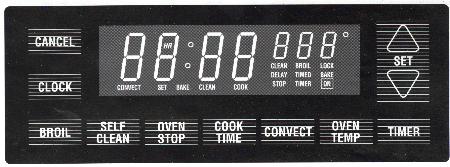
To adjust calibration:
- Press BAKE pad
- Select any temperature above 500 degrees F
- QUICKLY press and hold the BAKE pad approximately 5 seconds until "00" or the previously entered temperature is displayed
- Tap the arrow up or down pad to change the oven temperature +35 or -35 degrees in 5 degree steps.*
* Some clocks have a turn dial instead of arrow pads
A common GE clock/control
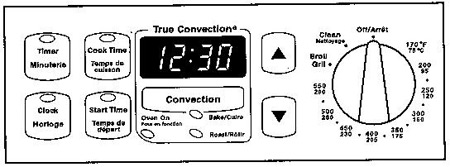
How to adjust the temp on this control
- Ensure the selector switch is turned off
- Hold the up and down arrows at the same time for 5 seconds until flashing "00" is displayed
- Press up arrow to increase temperature in the oven
- Press down arrow to decrease temperature in the oven
- Once the temperature is changed, once neither up or down pad has been pressed for 5 seconds the clock will save the new temperature and go back to the time of the day.
A common GE clock/control
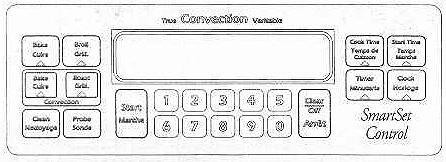
- Press: Bake and Broil at the same time for two seconds until the display shows "SF"
- Press: Bake once to increase temperature
- Press: Bake again to decrease temperature
- Adjust: Temperature with: Number pads
- Press: Start
The oven temperature can be adjusted up or down 35 degrees F / 20 degrees C. Use this feature if you think your oven is too hot or too cold. This adjustment will stay in memory.
Search 2.1 Million Appliance Parts

Related Links