



Shop for the perfect outfit for your little one! Check out our selection of baby costumes
Shop one of the largest inventories of plus size costumes online!

Microwave Oven Repair Help
Always remember Electricity is dangerous and should be treated with respect.
Microwaves are very dangerous, they can still shock you even unplugged!! These pages are to help give you indications of what might be wrong and some safe "how to check" and repair helps.

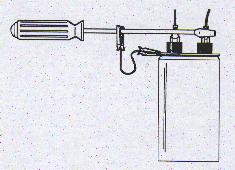
Use a metal ( not the shiny chrome type ) screw driver with a insulated handle to short across ( touch both at the same time ) the terminals of the high voltage capacitor to discharge it. With the microwave unplugged.
This is a common way to do this....
- A common flow chart for microwave repairs
- A breakdown of a newer counter style microwave
- Door switch caution and repair help
- Frigidaire OTR Microwave Disassembly Help
- GE OTR Microwave Disassembly Help
- How can I get at the handle screws on my microwave to replace the handle? This has a common GE style microwave picture to help you.
- How to install a common over the range microwave
- Important Disclaimer
- I set something on fire in my microwave and now it is dead...help!
- KitchenAid Microwave Disassembly Help
- My GE OTR ( Over The Range ) microwave is running but will not cook
- My Frigidaire microwave is flashing a fault code
- My GE microwave is flashing a fault code
- My Kenmore microwave is flashing a fault code
- My LG microwave is flashing a fault code
- My Panasonic microwave is flashing a fault code
- My Sharp microwave is flashing a fault code
- My Samsung microwave is flashing a fault code
- My Whirlpool microwave is flashing a fault code
- My microwave light bulbs burnt out...caution!!
- Ohm testing an capacitor
 OTR Microwave Filter Help
- Some common Microwave FAQ
- Some common components and how to check them with a ohm meter - like magnetron, high voltage transformer, high voltage capacitor, door switches and high voltage diode.
- Stainless Steel Cleaning
- Sparks from inside the oven area....why?
- Tips on changing a common door switch
- Whirlpool microwave repair helps and tips
- Whirlpool OTR Microwave Disassembly Help

Common problems and solutions -
Q - My microwave seems to shut off every once in a while, what might be wrong?
A - Make sure you hear the fan is still operating in your microwave. Next is to make sure the air intake grill on your microwave is not plugged up with air borne dust and dirt.
 Use an old tooth brush to help clean off the grille area.
Q - The microwave makes a loud "hum or buzz" noise but will not heat up the food?
A - 9 times out of 10 this is usually this is a bad magnetron, the other time is sometimes a bad high voltage diode. See components section.
Q - My microwave is running and sounds like it is working but will not heat up anything.
A - Many thing can do this but, common things are....loose high voltage wire.....poor solder joint on board.....magnetron.....power relay.....
Q - The microwave display counts down and the inside light is on, but nothing is heating and the fan is not running.
A - This most commonly is a bad door switch, other possible problems are a faulty relay or solder joint on the power module, but a bad door switch is most common.
Q - My microwave went dead when I opened the door ( same problem as closed the door ).
A - This often is a stuck or faulty door switch and it has blown the interior microwave fuse.
vQ - My microwave is completely dead.
A - House fuse has blown or interior fuse inside the microwave has blown ( usually a part inside the microwave makes this fuse blow ) Sometimes a bad fuse holder inside the microwave cannot hold the fuse tight enough and the fuse will blow as well.
Q - The fan in my microwave oven is not running will this hurt my microwave?
A - YES, the fan cools the magnetron and electronics, take the microwave in for service, most fans are not too expensive to replace.
Q - My microwave blows the fuse inside itself as soon as I push the start button.
A - Usually a shorted high voltage capacitor...see components section.
A copy and tip from Prashanth:
Description of problem (Maytag CMV1100Q):
Microwave stopped working while cooking. Replaced a 20AMP fuse.
When the cook cycle starts, microwave makes a groaning noise and stops. It loses power since the fuse is blown.
Solution: High-voltage capacitor shorted. Replaced it and microwave works fine.
Its located behind the fan underneath the high-voltage transformer.
- Remove the vent fan hood
- Remove the display control panel by removing the screw
- Take pictures of all the connections behind the control panel.
- Unhook all connections
- Remove the connections to fan
- Remove the fan
- Remove the screws and connections for interlocking switches.
- Make sure the high voltage capacitor is discharged!
- Remove the high voltage capacitor and replace
- Retrace the steps and put everything back.
Microwave works great now.
Q - I burnt something in my microwave and now it is dead...help!
A - The fuse inside the microwave may have blown, but more commonly the flame/oven thermostat has sensed the over cooked food and the flame/oven/cavity thermostat has opened up - Info on that.

Related Links:
- Microwave Capacitors
- How can I get at the handle screws on my microwave to replace the handle?
- I set something on fire in my microwave and now it is dead...help!
- Microwave Switchs

You Can Search APP's Massive Selection of Appliance Parts, But Did You Know They Also Have Parts For These...